Cookie compliance for WordPress.
Add automated cookie scans, widget banners, consent tools, and Google Consent Mode v2 directly to WordPress sites. For agencies, a partner account brings customer accounts and websites together across supported platforms.
QookieQloud for WordPress
Why choose QookieQloud for WordPress.
Designed specifically for modern digital agencies, developers, and store owners on WordPress.
Automated Script Blocking
QookieQloud automatically detects third-party tags on WordPress and prevents them from firing until the visitor has granted consent.
Google Consent Mode v2
Full native support for Google Consent Mode v2 without any coding required. Keep your Google Analytics & Ads models accurate.
Scheduled Cookie Scanning
When you add new scripts or update your WordPress theme, our scheduled audit scanner automatically discovers new cookies and flags changes.
Install, connect and manage your cookie banner in WordPress..
Install and activate WP Consent API and QookieQloud. Use the connection flow below if your plugin and account have v2 access.

Register account on QookieQloud
Create an account on app.qookieqloud.com and add your website domain in the dashboard first.
Open app.qookieqloud.comInstall WordPress Plugin
In your WordPress Admin panel, go to Plugins → Add New, search for "QookieQloud" and click Install & Activate.
WP Admin → Plugins → Add New → QookieQloud
Connect to QookieQloud
In the v2 plugin, open QookieQloud in WordPress and click Connect. Sign in in the popup, select a domain you manage or add one, and approve. The public and private API keys are saved automatically; no keys to copy.
Real-time consent stats inside your WordPress admin.
No need to switch between tabs. Track visitor consent rates, scan status, and audit scores directly on your WordPress admin dashboard widget.
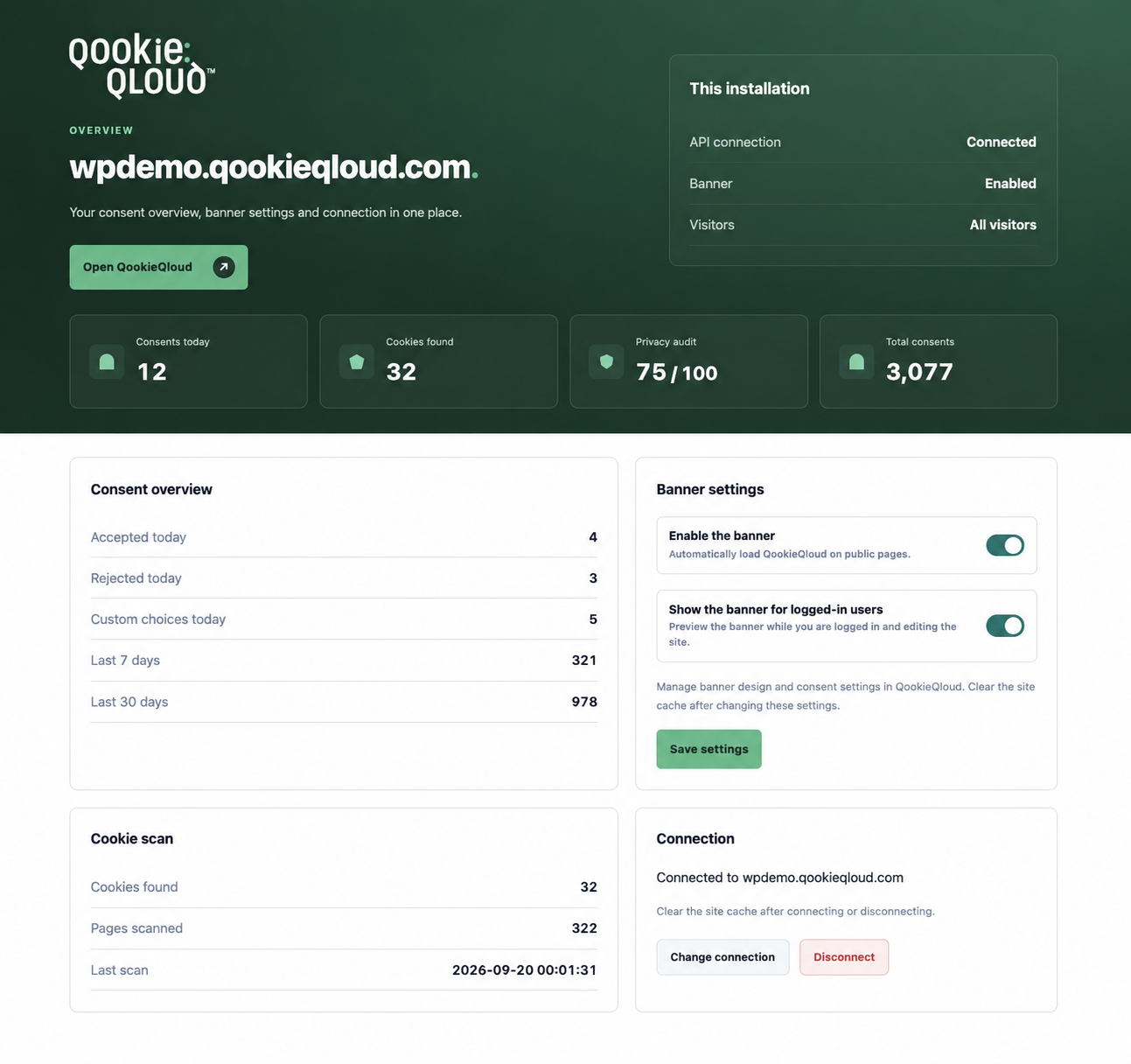
Live Consent Overview
Monitor daily, weekly, and monthly accepted vs. rejected ratios in real-time.
Audit Score & Scan Health
Immediate visibility of your compliance grade and discovered cookie status.
Banner and connection controls
Pause the banner, include logged-in visitors, change connection or disconnect from WordPress.
WordPress Consent API
Synchronizes seamlessly with WP core consent mechanisms and third-party plugins.
The QookieQloud™ WordPress Plugin offers native integration with your WordPress website. It automatically inserts the consent banner, blocks non-essential cookies and third-party scripts prior to user consent, and synchronizes real-time signals with Google Consent Mode v2.
Highlights:
- In the v2 plugin, open QookieQloud in WordPress and click Connect. Sign in in the popup, select a domain you manage or add one, and approve. The public and private API keys are saved automatically; no keys to copy.
- Smart Script Interception: Stops tracking pixels and analytic scripts before consent is given.
- Full WCAG 2.1 AA Accessibility: High contrast, keyboard navigation, and screen-reader compliant.
- Multilingual Support: Compatible with WPML, Polylang, and multi-site installations.
Frequently Asked Questions about WordPress.
Got questions about integrating QookieQloud with WordPress? Here are quick answers.
How do I install the QookieQloud WordPress plugin?
Install and activate WP Consent API and QookieQloud. Use the connection flow below if your plugin and account have v2 access. In the v2 plugin, open QookieQloud in WordPress and click Connect. Sign in in the popup, select a domain you manage or add one, and approve. The public and private API keys are saved automatically; no keys to copy. Existing v1 installations keep their current banner until you explicitly connect to v2. After connecting, changing banner settings or disconnecting, clear your page and CDN caches.
Is QookieQloud compatible with WooCommerce and caching plugins?
Yes. QookieQloud works flawlessly with WooCommerce, WP Rocket, LiteSpeed Cache, and W3 Total Cache without requiring cache-busting workarounds.
Explore other QookieQloud integrations
Connect QookieQloud across all your web projects
Ready to make your WordPress site fully compliant?
Run a free instant cookie scan today and see what third-party cookies your visitors receive before consent.